
3D Text Effects Bundle — Freebie | Extended License
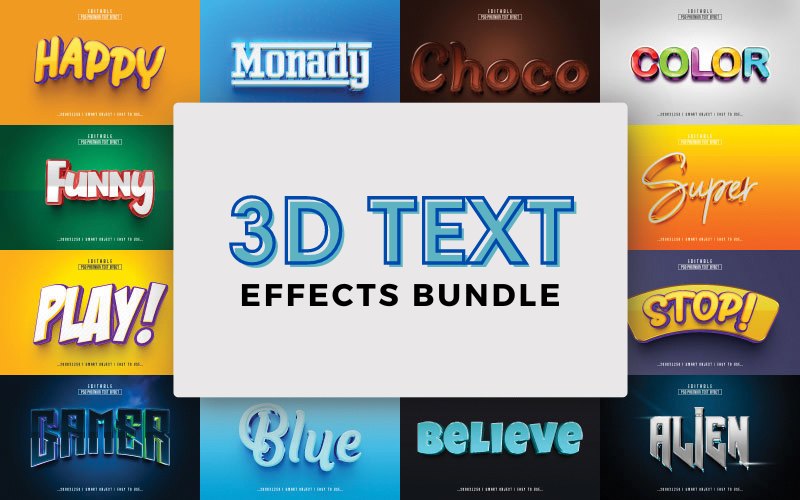
Transform your typography into eye-catching 3D elements in seconds. This free bundle includes 20 fully editable 3D text effects in PSD format — ready for Photoshop CC and optimized for high-quality results.
What’s included
- 20 free 3D text effects (PSD)
- Alien Text Effect
- Believe Text Effect
- Blue Text Effect
- Choco Text Effect
- Colour Text Effect
- Fresh Text Effect
- Funny Text Effect
- Gaming Text Effect
- Gamer Text Effect
- Happy Text Effect
- Monday Text Effect
- Play Text Effect
- Play1 Text Effect
- Play2 Text Effect
- Reflex Text Effect
- Royal Text Effect
- Stop Text Effect
- Super Text Effect
- True Text Effect
- Vintage Text Effect
Key features
- File type: PSD (Adobe Photoshop CC compatible)
- Colour mode: RGB
- Canvas size: 2000 × 1250 px
- Resolution: 300 dpi (high resolution)
- 100% editable via Smart Objects
- Works with text, vector shapes, or any shape layer
- Well-organised layers grouped for easy editing
- Extended license included
How it works
- Open the PSD in Adobe Photoshop CC.
- Double-click the Smart Object layer.
- Replace the text or shape inside the Smart Object and save.
- Return to the main document to see the updated 3D effect.
3D Text Effects Preview
Preview images are available on the product page (see product thumbnails for examples).
Deal terms
How do I download this bundle?
The bundle is delivered as an instant download after completing your purchase.
Which license is included?
This deal comes with an Extended License.
What are the usage terms?
- You may use these assets for both personal and commercial projects.
- You may not use or sell end products in a way that is directly competitive with the original item purchased.
- This bundle cannot be sublicensed, resold, shared, transferred, or otherwise redistributed on its own.
- You may not share the original bundle files with others.
Is lifetime access available?
Yes — you get lifetime access to the resources after downloading them to your device.
If you need any help editing the PSDs or want guidance applying these effects to a logo or vector, I can walk you through the steps.



There are no reviews yet.