
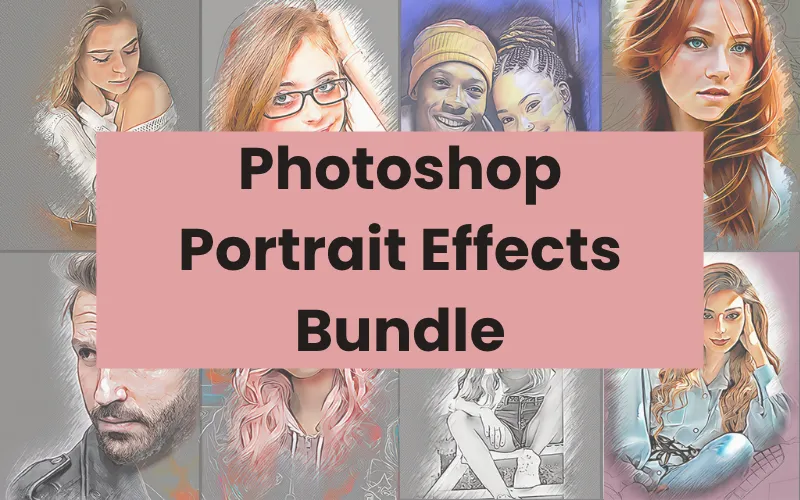
Portrait Studio — 21 Photoshop Portrait Effects Bundle
Extended Commercial License
Overview
Portrait Studio is a collection of 21 customizable Photoshop script effects made specifically for portrait and AI-generated portrait images. Each effect is a layered, drag-and-drop JSX script that instantly transforms your photos into stylized, professional artwork without altering the original file.
Designed to work on Photoshop CS 2019 through CC 2026 (26.8.0) and compatible with macOS and Windows, these scripts require no extra plugins and are easy to use — perfect for photographers, designers, content creators, and illustrators who need fast, consistent portrait looks.
How to use Photoshop scripts (quick tutorial):
https://www.youtube.com/watch?v=aftj_ZVbGnw
What’s Included
- 21 Photoshop portrait effects (JSX script files)
- Drag-and-drop installation (File > Scripts > Browse)
- Instant download after purchase
- Extended Commercial License
- Lifetime access to the downloaded resources
- Support from the vendor
Key Features
- 21 ready-to-use portrait effects tailored for both photographic and AI portraits
- Layered, editable results — adjust opacity, blend modes, and layer visibility to customize each look
- One-click application for fast batch-style workflows
- No additional plugins required
- Works on macOS and Windows
- Compatible with Photoshop CS 2019 → Photoshop CC 2026 (v26.8.0)
Specifications
- Format: JSX (Photoshop script)
- Number of effects: 21
- Compatible Photoshop versions: CS 2019 through CC 2026 (26.8.0)
- System compatibility: macOS & Windows
How to Use the Scripts
- Open your portrait image in Photoshop.
- From the Photoshop menu choose: File → Scripts → Browse.
- Select the desired effect file (example.jsx) and click Open.
- The script will process the image and create snapshots or layered results for the selected effect.
- Tweak layers, opacities, and blend modes as needed to fine-tune the look.
Typical Uses
- Stylize AI-generated portraits into artwork with specific moods and tones
- Quickly enhance portraits for social media, branding, posters, and packaging
- Create consistent visual styles across multiple projects with one-click effects
- Produce final assets for greeting cards, book covers, magazine spreads, and ads
License & Terms (Extended Commercial License)
- You receive an Extended Commercial License with this bundle.
- You may use these assets for personal and commercial end products.
- You may not redistribute, resell, sublicense, share, or transfer the original bundle files on their own.
- The end products must not be used or sold in a way that is directly competitive with the original item purchased.
- This bundle cannot be shared or given to others as a standalone product.
Delivery, Access & Support
- Delivery: Instant download after purchase.
- Lifetime access: Yes — once downloaded, you have lifetime access to the files on your device.
- Support: Available. For support, visit https://www.pencilpixels.com/html/contact.html
If you’d like, I can produce a short usage checklist or example workflows for portrait retouching with these scripts.
User Reviews
Be the first to review “Portrait Studio: 21 Photoshop Effects Bundle”

Related Products

There are no reviews yet.