
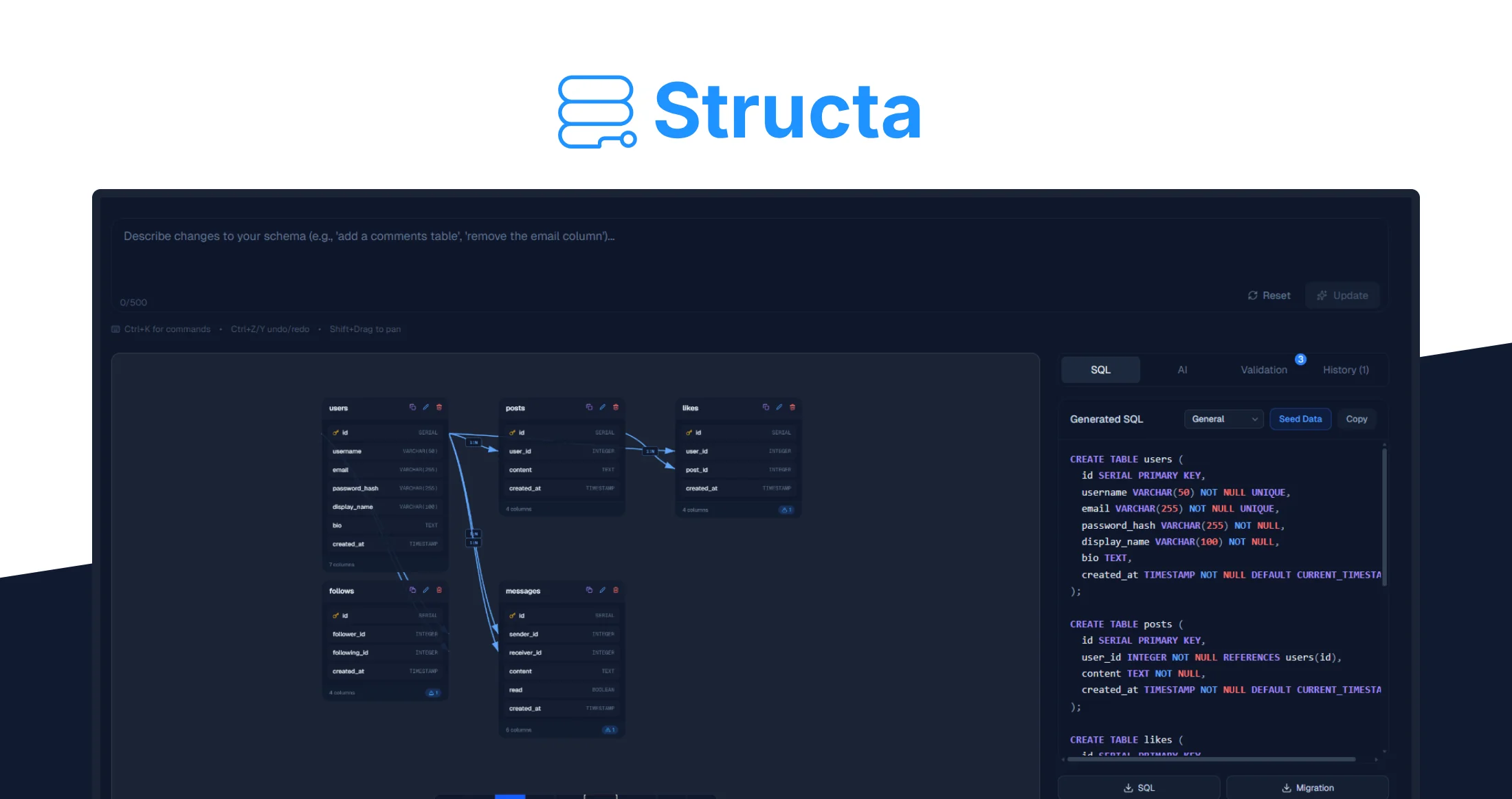
N bɛɛ Structa?
N bɛɛ jɔfɛfɛfɛw ka database bɛɛ yira.
N bɛɛ fɔlɔ SQL, debug bɔ AI kɔfɛfɛ, ni switch bɛɛ diagram tools, SQL editors, ni ORM converters.
Tools AI kɛlɛya fɛɛrɛw bɛɛ ChatGPT bɛɛ fɔ SQL, n bɛɛ fɔ:
Structa bɛɛ fɔ ni database design kɛlɛya fɛɛrɛw.
N bɛɛ fɔ AI assistant kɛlɛya fɛɛrɛw, Structa bɛɛ fɔ system kɛlɛya fɛɛrɛw ka fɔ schemas bɛɛ valid, normalized, ni production-ready.
Kɔfɛ kɔrɔba bɛɛ fɔ:
-
Schema bɛɛ validated ka fɔ export, ni a bɛɛ fɔ ka fɔ relationships ni constraints bɛɛ fɔ
-
Visual editing fɔlɔ AI bɛɛ fɔ ka fɔre bɛɛ
-
Export bɛɛ fɔ multiple formats ka fɔ SQL ni Prisma
-
One-click deployment to Supabase
-
Version history fɔ ka fɔ schema bɛɛ fɔ
-
AI Fix fɔ ka fɔ repair bɛɛ broken schema logic
Structa isn’t another AI wrapper. It’s an end-to-end database design workflow.
N bɛɛ Fɔlɔ
Structa bɛɛ fɔ database design ka fɔ simple, streamlined workflow. N bɛɛ fɔ SQL bɛɛ fɔ ka fɔ, ni stitching bɛɛ tools fɛɛrɛw, n bɛɛ fɔ ka fɔ idea ni production-ready schema ka fɔ fɛɛrɛw kɔfɛ.
1. Fɔlɔ N bɛɛ App Kɛlɛya
Fɔlɔ ka fɔ describe n bɛɛ application ka fɔ plain English.
N bɛɛ fɔlɔ:
“A SaaS project management app ka bɛɛ users, teams, tasks, comments, ni permissions.”
Structa bɛɛ analyze n bɛɛ description ni fɔlɔ bɛɛ generate fɔ structured database schema ka fɔ include:
A bɛɛ fɔ ka fɔ n bɛɛ clean starting point bɛɛ, fɔ SQL bɛɛ fɔ ka fɔ.
2. Review the Generated Schema
Structa bɛɛ fɔ normalized, production-ready database structure.
N bɛɛ fɔ ka fɔ instantly see:
Schema bɛɛ validated bɛɛ before export, ni a bɛɛ fɔ ka fɔ real-world use.
3. Edit Visually
Need to make changes? You can adjust the schema directly using the visual editor.
With the drag-and-drop interface you can:
This eliminates the need to rewrite SQL or regenerate prompts.
4. Export or Deploy
Once your schema is ready, Structa lets you export it in multiple formats:
-
SQL
-
Prisma schema
-
migration files
-
ER diagrams
You can also deploy directly to Supabase with a single click, turning your database design into a working backend almost instantly.
Key Features That Turn Ideas into Real Databases

-
AI Schema Generator
Describe your backend in plain English and generate a fully structured database schema in seconds. -
Visual Schema Editor
See your database architecture visually and modify tables and relationships using a drag-and-drop interface. -
Production-Ready SQL
Structa generates validated SQL including: -
AI Fix Engine
If a schema has logical issues or missing relationships, the AI Fix tool repairs it instantly. -
Export Anywhere
Export your database design to: -
Supabase Deployment
Deploy directly to Supabase with automatic migrations and iterative schema updates. -
Version History
Track schema changes and revert versions whenever needed.

Who’s Structa Best For?
Structa is designed for developers and builders who want to move from idea to backend infrastructure quickly.
-
Indie Hackers
Perfect for building MVPs without spending hours designing database structures. -
Backend and Full-Stack Developers
Generate validated schemas faster than writing SQL manually. -
Technical Founders
Rapidly prototype SaaS products without deep database engineering. -
Freelancers and Agencies
Deliver backend architecture for client projects more efficiently. -
Hackathon Participants
Design production-ready database schemas in minutes instead of hours.

[ad_2]
User Reviews
Be the first to review “Structa – Low Price – Exclusive Lifetime Deal”

Original price was: $ 299,00.$ 149,00Current price is: $ 149,00.
Related Products
CopyElement – Low Price – Exclusive Lifetime Deal

There are no reviews yet.